
To list property on Hotels.com is one of the smartest revenue decisions you can make.
Hotels.com is part of the Expedia Group. It attracts over 150 million visitors every month globally. For Indian hotel owners, this means access to an enormous pool of domestic and international travellers. Your property gets seen by guests you could never reach on your own.
But listing is just the beginning. The real secret to success is how you manage your listing — pricing, reviews, content, and channel strategy. This guide covers everything. Step by step.
We are StayWithUs — India’s AI-powered hospitality network. We have helped 2,400+ hotels grow their revenue by an average of 38%. We know what works.
📞 Need help listing and growing your property faster? 🏨 List Your Hotel Free on StayWithUs | 💬 WhatsApp Us | 📧 onboarding@staywithus.in | 📞 +91 95559 36665
What Is Hotels.com and Why Does It Matter?
Hotels.com is a global OTA (Online Travel Agency). It was founded in 1991 and is headquartered in Dallas, USA. It operates in 90+ countries and 40+ languages.
For Indian hoteliers, Hotels.com brings:
- International travellers who book months in advance
- Business travellers seeking corporate-friendly properties
- Leisure tourists comparing options across 500+ platforms
- Loyalty programme guests who specifically prefer Hotels.com
When you list property on Hotels.com, your rooms enter this massive ecosystem. The more optimised your listing, the higher your ranking. The higher your ranking, the more bookings you receive.
Step-by-Step: How to List Property on Hotels.com
Here is the exact process to get your property live on Hotels.com in India.
Step 1: Visit the Hotels.com Partner Portal
Go to partner.hotels.com or expediagroup.com/lodging. These are the official portals for new property registrations in India.
Step 2: Click “List Your Property”
Click the registration button. You will be directed to a form. It collects basic property details.
Step 3: Enter Your Property Information
You will need to provide:
- Property name and type (hotel, resort, guesthouse, homestay)
- Full address with PIN code
- Contact name and email address
- Number of rooms and room types
- Star rating (if applicable)
- GST registration number (mandatory for Indian properties)
Keep your details accurate. Inaccurate details delay approval.
Step 4: Upload Property Photos
Photos are the most important part of any listing. Upload high-resolution images of:
- Exterior of the property
- Lobby and reception
- Each room type (minimum 5 photos per room)
- Bathroom, bed, and amenities close-ups
- Restaurant, pool, and common areas
Properties with 20+ photos receive 3x more views. Do not skip this step.
Step 5: Set Your Room Types and Rates
Define each room category clearly. Set your base rates per night. You can also set:
- Weekend and weekday pricing
- Seasonal rates
- Advance purchase discounts
- Last-minute deals
Hotels.com recommends competitive pricing based on your market. Use this data carefully.
Step 6: Define Your Cancellation Policy
Choose from:
- Free cancellation (higher visibility)
- Non-refundable (lower commission rate)
- Partial refund options
Free cancellation listings rank significantly higher on Hotels.com. Keep this in mind.
Step 7: Review and Submit
Review every detail. Submit the form. Approval typically takes 3 to 7 business days. You will receive a confirmation email with your listing ID.
Common Mistakes When You List Property on Hotels.com
Many hoteliers make avoidable errors. Here are the top mistakes to avoid.
❌ Poor quality photos: Blurry or dark photos destroy your click-through rate. Invest in a professional shoot once.
❌ Incomplete amenity listing: Missing amenities like Wi-Fi, parking, or breakfast reduce your ranking score.
❌ Ignoring guest reviews: Hotels.com heavily weights review responses in its ranking algorithm. Reply to every review.
❌ Static pricing: Hotels that never update rates lose bookings to dynamic competitors. Use AI pricing tools.
❌ Single OTA dependency: Relying only on Hotels.com limits your reach. Multi-channel distribution multiplies revenue.
How StayWithUs Amplifies Your Hotels.com Listing
Listing on Hotels.com is the first step. Growing on it is a different game.
StayWithUs is India’s most intelligent hospitality network. When you join StayWithUs, you get tools that make your Hotels.com listing — and every other channel — perform at its peak.
Here is what StayWithUs adds to your distribution strategy:
✅ AI Dynamic Pricing
Our AI engine monitors demand patterns 24/7. It automatically adjusts your rates across channels. You earn the maximum possible revenue every night — even while you sleep.
Properties using StayWithUs AI pricing report up to +91% RevPAR optimisation.
✅ Multi-Channel Sync
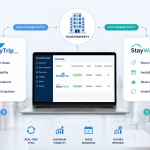
When you list property on Hotels.com alongside other OTAs, inventory management becomes complex. StayWithUs syncs your availability across all channels in real time. No double bookings. No manual updates.
✅ Verified B2B Travel Agent Network
StayWithUs connects your property to 850+ verified travel agents across India. These agents send guaranteed, commission-negotiated bookings directly. Zero dependency on any single OTA.
✅ White-Label Booking Engine
StayWithUs gives you a branded direct booking engine. You capture guests who found you on Hotels.com — and convert them to zero-commission direct bookings next time.
👉 Join StayWithUs as a Hotelier — It’s Free
Optimising Your Hotels.com Listing for Maximum Visibility
Getting listed is easy. Getting seen is the real work. Here are proven optimisation strategies.
Write a Compelling Property Description
Your description should answer three questions:
- Who is this property perfect for?
- What makes it unique?
- What is nearby?
Use clear, simple language. Avoid superlatives like “best” without evidence. Mention local landmarks, transport links, and popular attractions.
Collect Reviews Aggressively
Ask every guest to leave a review. Send a follow-up message at checkout. A property with 100+ reviews ranks far above one with 10 reviews.
Respond to every review — positive and negative. This signals active management to the Hotels.com algorithm.
Use Promotions Wisely
Hotels.com offers promotional tools like:
- Early Bird Discounts — attract planners
- Last-Minute Deals — fill unsold inventory
- Mobile Exclusive Rates — boost mobile bookings
Activate at least one promotion at all times.
Hotels.com vs Other OTAs: Where Should You Focus?
| Platform | Best For | Commission |
|---|---|---|
| Hotels.com | International & corporate travellers | 15–20% |
| MakeMyTrip | Domestic Indian travellers | 12–18% |
| Booking.com | Budget and mid-scale hotels | 15–17% |
| Agoda | Southeast Asian & Asian travellers | 15–18% |
| StayWithUs | B2B agent bookings, direct revenue | Zero OTA commission |
The smart strategy is to list on all relevant OTAs. Manage them all through one platform. StayWithUs makes this effortless.
Want to go deeper on other platforms? Read our related guides:
📖 How to List Property on Booking.com — complete step-by-step guide for Indian hotels
📖 How to List Property on MakeMyTrip — and why StayWithUs is the smarter choice
📖 How to List Property on Agoda — full guide plus why to choose StayWithUs
📖 How to List Property on Goibibo — complete guide with Goibibo vs StayWithUs comparison
📖 How to List Property on Expedia — complete guide for hotel owners
📖 How to List Property on EaseMyTrip — complete guide for Indian hoteliers
Final Thoughts
Every night your property sits unlisted is a night of lost revenue. Every manual rate update is wasted time.
The decision to list property on Hotels.com is the right first step. Backing it with smart technology is what separates top-performing hotels from average ones.
StayWithUs is trusted by 2,400+ hotels across India. Join us and start growing today.
Frequently Asked Questions
Q1: How do I list property on Hotels.com in India?
Visit partner.hotels.com or the Expedia Group lodging portal. Fill in your property details, upload photos, set room types and rates, then submit. Approval takes 3 to 7 business days. You will need your GST number and property address ready.
Q2: Is listing on Hotels.com free?
Yes, Listing your property on Hotels.com is free. Hotels.com earns revenue through commission on completed bookings, typically 15 to 20% per reservation.
Q3: How long does it take to list property on Hotels.com?
The registration form takes 30 to 60 minutes to complete. After submission, approval takes 3 to 7 business days. Your listing goes live once approved.
Q4: What documents do I need to list property on Hotels.com in India?
You need your GST registration number, property address, bank account details for payouts, and identity proof of the property owner or authorised signatory.
Q5: Can small hotels and guesthouses list on Hotels.com?
Yes, Hotels.com accepts all types of properties — hotels, resorts, guesthouses, homestays, service apartments, and boutique properties of any size.
Q6: How can I get more bookings after I list property on Hotels.com?
Upload professional photos, keep pricing competitive, collect guest reviews, and use promotional tools. Connecting to a multi-channel platform like StayWithUs dramatically increases your total booking volume.
Q7: What is StayWithUs and how does it help hotel owners?
StayWithUs is India’s AI-powered hospitality network. It connects hoteliers to 850+ travel agents, provides AI dynamic pricing, multi-channel sync, and a direct booking engine. It helps hotels reduce OTA dependency and grow revenue by an average of 38%.
Q8: Is it better to list on multiple OTAs or just Hotels.com?
Multi-channel distribution always outperforms single-platform listing. List on Hotels.com, MakeMyTrip, Booking.com, Agoda, and also join StayWithUs for direct and B2B agent bookings.
Q9: How does AI pricing work for hotel listings?
AI pricing tools monitor local demand, competitor rates, and seasonal trends. They automatically adjust your room rates to maximise occupancy and revenue. StayWithUs offers this as a built-in feature for all partner hotels.
Q10: Can I manage my Hotels.com listing from one dashboard?
Yes, StayWithUs provides a unified dashboard. You manage rates, availability, and performance across all channels — including Hotels.com — from a single platform.
Get Started With StayWithUs Today
You now know exactly how to list property on Hotels.com. You also know how to maximise what that listing delivers.
The hotels growing fastest in India are not just listed on one platform. They are using smart, AI-powered networks like StayWithUs to multiply revenue from every channel.
Your next step is simple.
📋 List Your Hotel: Join StayWithUs Free 💬 WhatsApp: Chat Now 📧 Email: onboarding@staywithus.in 📞 Call: +91 95559 36665