
If you own a hotel, homestay, villa, apartment, or boutique guesthouse in India, the decision to list property on Booking.com can open your doors to millions of international and domestic travellers overnight. With over 28 million listings across 226 countries, Booking.com is one of the world’s largest travel platforms. But is it the right fit for every Indian property owner? In this complete guide, we walk you through exactly how to list property on Booking.com — every step, every document, every detail — and then compare it honestly with StayWithUs.in, India’s fast-growing platform built specifically for independent hosts.
📖 Want to explore other OTA listing guides? Visit our Blog Page for step-by-step guides covering MakeMyTrip, Goibibo, Agoda, and more.
Part 1: How to List Your Property on Booking.com — Step by Step
Booking.com accepts a wide range of property types — from large hotels to single-room homestays. The registration process happens through the Booking.com Extranet, which is the official partner dashboard where you manage your listing, pricing, availability, and reservations. When you list property on Booking.com, you gain immediate access to one of the most visited travel platforms in the world.
Step 1: Visit the Booking.com Partner Sign-Up Page
Go to join.booking.com and click “Get Started.” This is the official partner registration portal. Never use third-party websites claiming to list property on Booking.com on your behalf — always go directly to the official URL to protect your property information and avoid unnecessary fees.
Step 2: Create Your Partner Account
Enter your first name, last name, and a valid email address. Create a strong password with a minimum of 10 characters including at least one number, one uppercase letter, and one lowercase letter. Verify your email address by clicking the confirmation link sent to your inbox.
💡 Important Note: Booking.com runs two completely separate platforms — one for travellers and one for property owners. Make sure you sign up on the partner side when you list property on Booking.com. Starting on the wrong side wastes time and creates account confusion.
Step 3: Select Your Property Type
This is one of the most important decisions you make when you list property on Booking.com. The category you choose determines how guests find you through search filters and which audience segments your property reaches.
🏨 Hotel Best for traditional hotels, boutique hotels, resort properties, and business hotels. Select this if you run a property with multiple defined room categories, front desk services, restaurant facilities, and professional hospitality infrastructure.
🏡 Homes — Apartments, Villas and Vacation Homes Best for private villas, holiday apartments, vacation homes, farmstays, and entire properties rented exclusively to guests. If you own a villa in Goa, a holiday cottage in Coorg, or a mountain apartment in Manali — this is your category when you list property on Booking.com.
🛏️ Homestays, B&Bs and Guesthouses Best for homestays, bed and breakfast properties, guesthouses, and lodges where the owner or host may also live on-site. This category suits independent Indian hosts offering rooms within their own home or a small managed guesthouse and covers properties that deliver a personal, locally rooted guest experience.
⛺ Alternative Places Best for treehouses, glamping tents, boats, campsites, heritage havelis, and unusual or unique stays. If your property does not fit neatly into the above three categories, this option covers unconventional and experience-first accommodations that attract travellers seeking something genuinely different.
Step 4: Enter Property Details
Fill in your property’s full name, complete address, city, state, and pin code. Place the location pin accurately on the map — this step is critical when you list property on Booking.com. Booking.com may send a physical verification letter to your registered address, so ensure the address is 100% correct. Changing your address after submission is difficult and time-consuming.
Step 5: Add Room or Unit Details
Add each room type or unit you offer. For every room, include the room name, room type such as Standard, Deluxe, or Suite, bed configuration including single, double, twin, or king, maximum occupancy, room size in square metres if available, and whether it is a private room or shared space. The more detail you provide when you list property on Booking.com, the more confidence guests feel when making a booking decision.
Step 6: Add Amenities and Facilities
List every amenity your property offers. Amenities that consistently increase booking conversion include Free Wi-Fi, Air Conditioning, Free Parking, Swimming Pool, Breakfast included or available, Kitchen or Kitchenette, Hot Water, TV, Balcony or Terrace, Airport Transfers, and Housekeeping.
Booking.com allows you to filter amenities by category — bedroom, bathroom, kitchen, outdoor, accessibility, and more. Never skip this step — amenities directly impact your search ranking after you list property on Booking.com and represent one of the strongest conversion drivers on the platform.
Step 7: Set Your Pricing and Availability
Set your base nightly rate for each room type. Configure seasonal pricing, weekend rates, long-stay discounts, early bird rates, and last-minute deals to capture bookings across different demand patterns. Booking.com operates on a commission-based model — they charge no upfront listing fee and instead deduct approximately 15% from each confirmed booking. Factor this commission into your base rate so your net earnings meet your financial targets after you list property on Booking.com.
Step 8: Configure Policies
Set your check-in and check-out times, minimum and maximum stay requirements, cancellation policy type — flexible, moderate, strict, or non-refundable — pet policy, smoking policy, and house rules. You can also enable the Request to Book feature, which lets you review and approve reservations before confirmation. This feature gives you greater control over who stays at your property and works particularly well for hosts who want to maintain a specific guest experience standard.
Step 9: Upload Photos
Upload high-resolution photos of every room type, common areas, outdoor spaces, amenities, and the property exterior. Use landscape orientation and natural daylight where possible. Booking.com recommends a minimum of 10 photos per listing. Properties with 20 or more quality photos consistently outperform those with fewer images in search rankings and booking conversion rates.
💡 Pro Tip: You can import your review scores from other platforms like MakeMyTrip or Airbnb into your Booking.com listing. This imported social proof builds guest confidence before your first Booking.com review arrives and accelerates the trust-building process significantly after you list property on Booking.com.
Step 10: Set Up Your Payment Method
Choose how you want to receive payments. Booking.com offers two options — you can let Booking.com collect payment from guests on your behalf through Payments by Booking.com, or you can collect payment directly from guests at the property and pay Booking.com their commission separately.
For Indian hosts, Payments by Booking.com currently offers daily payouts at check-in with the Payments Service Fee waived for 2026 — making it one of the most attractive payout structures among major OTA platforms. This daily payout model significantly improves cash flow for independent hosts compared to the standard weekly or monthly settlement cycles of most platforms.
Step 11: Verify Your Property Location
Booking.com verifies your property address through one of two methods — either by calling your registered phone number to confirm the address details, or by posting a physical letter with a unique verification code to your property address within 25 days of registration. Enter the code in the Extranet when you receive it to complete location verification.
Never ignore this step. Failure to complete location verification can result in your listing being suspended or removed from search results entirely, undoing all the work you invested to list property on Booking.com.
Step 12: Go Live
Once all details are submitted, Booking.com reviews your listing. After approval, click “Open for Bookings” and your property goes live on the platform. You receive a confirmation email summarising your settings. You now manage your listing, update availability, adjust prices, and respond to reservation requests through the Booking.com Extranet or mobile app.
Documents Required When You List Property on Booking.com
Prepare these documents before you begin the registration process to avoid delays:
- Valid Government ID — Aadhaar Card, Passport, or Driving Licence
- PAN Card — mandatory for Indian hosts for tax compliance
- GST Registration Certificate — required if annual turnover exceeds ₹20 lakhs
- Property Ownership Document or Lease Agreement
- Bank Account Details — Account Number, IFSC Code, and Bank Name
- Cancelled Cheque or Bank Statement for account verification
- Business Registration Certificate — if listing as a company or LLP
💡 Pro Tip: If your property already has listings on MakeMyTrip or Airbnb, you can import your property information directly into Booking.com to speed up the setup process. You can also connect a channel manager to sync availability across all platforms and eliminate double booking risk entirely.
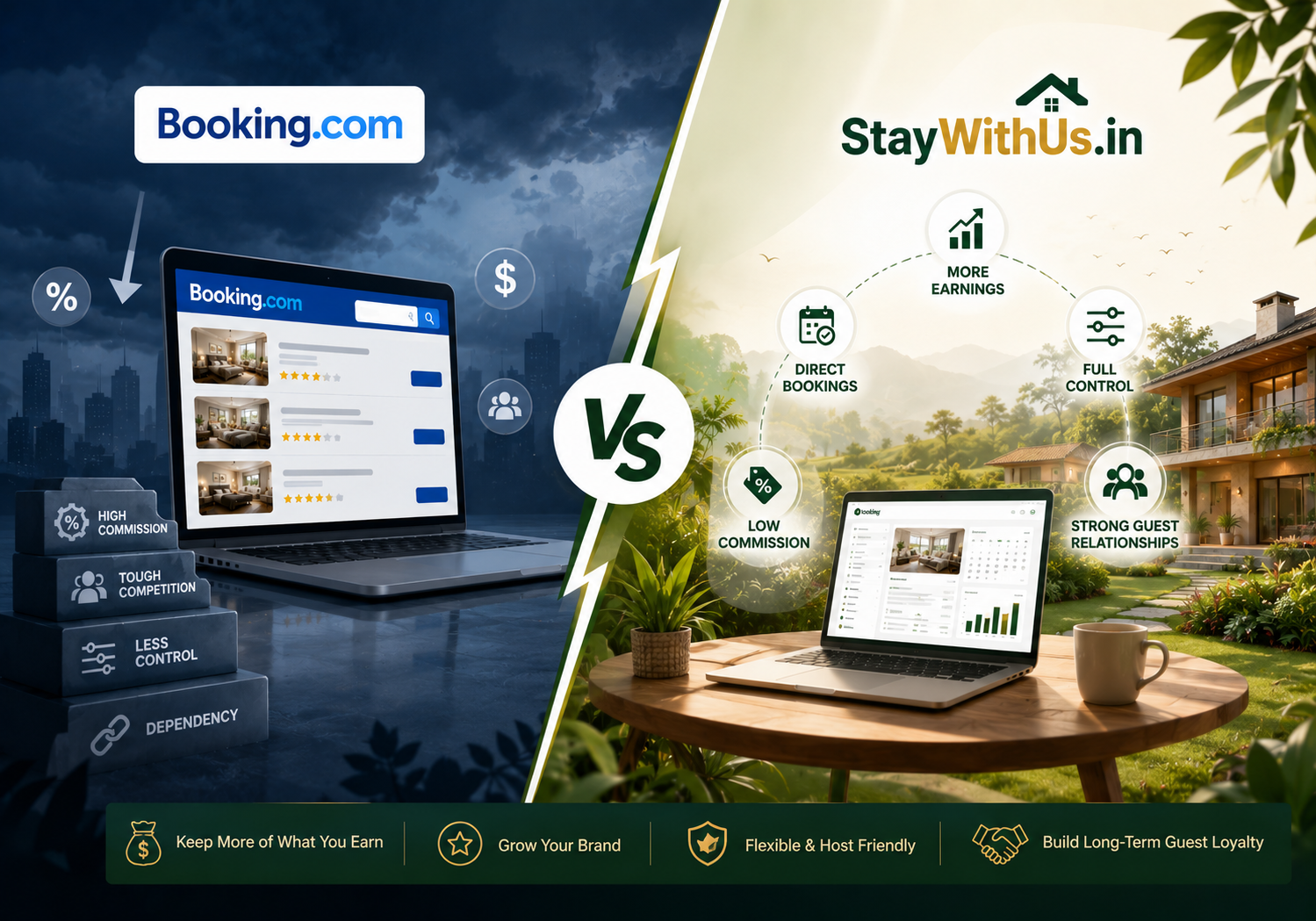
Booking.com vs StayWithUs.in — An Honest Comparison for Indian Hosts
Now that you know exactly how to list property on Booking.com, the more important question is whether Booking.com is actually the right primary platform for your specific property. Booking.com is powerful — but global scale comes with global competition. For Indian independent hosts, the platform landscape is more nuanced than it first appears.
Here is a detailed category-by-category comparison between Booking.com and StayWithUs.in:
| Feature | Booking.com | StayWithUs.in |
|---|---|---|
| Audience Reach | Global — 28M+ listings, 500M+ annual visitors | India-focused — targeted domestic travellers |
| Property Types | Hotels, villas, apartments, homestays, glamping, boats | Homestays, villas, boutique stays, unique properties |
| Commission | ~15% per booking + optional Visibility Booster fees | Lower, host-friendly commission structure ✅ |
| Listing Process | 12-step process, address verification letter up to 25 days | Simplified onboarding, faster go-live ✅ |
| Competition | Extremely high — competing with global hotel chains | Niche platform — less competition, better visibility ✅ |
| Host Support | Ticket-based support, large platform, slower resolution | Personalised host relationship management ✅ |
| Guest Type | International and domestic, price-driven, brand-loyal | Experience-driven Indian travellers seeking unique stays ✅ |
| Payout Speed | Daily payouts at check-in via Payments by Booking.com | Fast, transparent payout process ✅ |
| Language and Local Support | English-primary, limited local language support | India-first platform, understands local host needs ✅ |
| Ranking Algorithm | Genius Loyalty program favours large properties with reviews | Fair visibility for new and small properties ✅ |
| Best For | Hotels and established properties targeting international guests | Independent hosts, homestays, boutique and unique properties ✅ |
The Bottom Line
When you list property on Booking.com, you access an essential global platform for reaching international guests and leveraging worldwide brand recognition. Its 15% commission sits among the lowest of the major global OTAs, and its reach is genuinely unmatched. However, for Indian independent hosts — especially those running homestays, boutique villas, or unique rural properties — the platform’s global scale works against you. You compete directly against international hotel chains, resort brands, and properties carrying thousands of established reviews. Small independent hosts get buried in search results.
StayWithUs.in solves this problem entirely. It is a platform built for exactly the kind of property that gets overlooked when you list property on Booking.com — independent, personal, and full of character. Your property does not compete against five-star hotels. It gets showcased directly to travellers who are actively searching for what you offer.
When Should You Choose StayWithUs.in as Your Primary Platform?
You are a first-time host Booking.com’s algorithm heavily favours properties with existing reviews and Genius programme status. New listings start at a significant competitive disadvantage. StayWithUs.in gives new hosts fair, equitable visibility from day one — no review history required.
You run a homestay, B&B, or small guesthouse Small independent properties routinely get outranked by large hotel chains after they list property on Booking.com. StayWithUs.in’s audience specifically seeks personal, hosted stays — making your size an advantage rather than a handicap.
You own a villa, farmstay, or heritage property Guests on StayWithUs.in are experience-driven travellers actively looking for unique stays with character and story. Your heritage haveli, Himalayan farmstay, or Goa beachside villa is exactly what they are searching for.
You want to keep more of your earnings Every percentage point of commission matters for small independent properties. StayWithUs.in’s host-friendly fee structure means significantly more of each booking goes directly into your pocket compared to what you keep when you list property on Booking.com.
You want real support, not a ticket number StayWithUs.in’s host team works directly with property owners — helping you optimise your listing, improve your photos, and resolve issues quickly. No call centres, no automated responses, no waiting in a global support queue.
💡 Smart Strategy: List property on Booking.com for international reach and use StayWithUs.in as your primary platform for high-quality domestic bookings. Connect a channel manager to sync your availability calendar across both platforms in real time — eliminating double booking risk while maximising total occupancy year-round. Start with StayWithUs.in for your core bookings, then expand to Booking.com as you scale.
📖 For more information on how to list your property on other OTAs, visit our Blog Page — we cover all major platforms including MakeMyTrip, Goibibo, Agoda, and more with complete step-by-step guides.
→ List Your Property on StayWithUs.in — Free, Fast and Fully Supported
Frequently Asked Questions
Everything hotel owners, homestay hosts, villa owners, and independent property managers need to know about listing on Booking.com and StayWithUs.in.
How do I list my property on Booking.com?
To list property on Booking.com, visit join.booking.com, create a partner account with your email and password, select your property type — hotel, home, homestay, or alternative place — enter your property details and location, add room types and amenities, set your pricing and policies, upload photos, configure your payment method, and submit for verification. Once approved, click “Open for Bookings” to go live on the platform.
Is it free to list property on Booking.com?
Yes, listing property on Booking.com is completely free. Booking.com charges no upfront registration fees or monthly subscription costs. The platform earns revenue by charging a commission of approximately 15% on each confirmed booking. This commission deducts automatically before your payout processes.
How long does Booking.com take to verify a new property listing?
The Booking.com listing review process typically takes between 24 hours and 3 business days for online approval. However, address verification — which involves receiving a physical letter with a unique code mailed to your registered property address — can take up to 25 days. Your listing can still receive bookings during this period, but you must complete full verification to maintain your account in good standing.
What is Booking.com’s commission rate for Indian hosts?
Booking.com charges a standard commission of approximately 15% per confirmed booking for most property types in India when you list property on Booking.com. This rate can vary slightly based on property type, location, and whether you opt into promotional programmes like Genius or Visibility Booster. Additional fees may apply if you use the Payments by Booking.com service.
Can I list a homestay on Booking.com?
Yes, Booking.com fully supports homestay listings under the Homestays, B&Bs and Guesthouses property category. You can list individual rooms within your home or your entire property when you list property on Booking.com. As a homestay host, you can specify whether you live on-site, set house rules, and personalise your listing to reflect the authentic hosted experience you offer guests.
Can I list a villa on Booking.com?
Yes, villas fall under the Homes category on Booking.com, which covers entire-property rentals including private villas, holiday homes, vacation apartments, and farmstays. This category suits villa owners in popular Indian destinations like Goa, Kerala, Coorg, Lonavala, and Rajasthan who want to attract both domestic and international travellers when they list property on Booking.com.
What documents do I need to list property on Booking.com in India?
To list property on Booking.com in India, you need a valid government ID such as Aadhaar, Passport, or Driving Licence, a PAN Card, a GST Certificate if applicable, a property ownership document or lease agreement, and bank account details including IFSC code and a cancelled cheque for payout setup.
What is StayWithUs.in and how does it compare to Booking.com?
StayWithUs.in is an Indian property listing platform designed specifically for independent hosts, homestays, boutique villas, and unique accommodations. Unlike Booking.com, which is a global platform where you compete against international hotel chains when you list property on Booking.com, StayWithUs.in connects Indian hosts directly with experience-driven domestic travellers. It offers lower commissions, personalised host support, a simpler listing process, and better visibility for small and independent properties.
Should I list my homestay on Booking.com or StayWithUs.in?
For maximum occupancy, list on both platforms. Booking.com gives you access to international guests and a globally recognised brand when you list property on Booking.com. StayWithUs.in connects you with high-quality Indian travellers who specifically seek authentic, personal, and unique stays. Use a channel manager to sync availability across both platforms and avoid double bookings. Most independent Indian hosts find that StayWithUs.in delivers better-quality domestic bookings with lower fees and more personalised ongoing support.
How do I list my property on StayWithUs.in?
To list your property on StayWithUs.in, visit staywithus.in and click the List Your Property option. Fill in your property details, upload your photos, and complete the simple onboarding process with dedicated host support at every step. StayWithUs.in makes the process significantly faster and easier than the 12-step process you go through when you list property on Booking.com — with no physical verification letters and no lengthy approval timelines.
Which is the best platform to list a hotel or homestay in India in 2026?
In 2026, the best platforms to list a hotel or homestay in India are StayWithUs.in, Booking.com, MakeMyTrip, and Airbnb. For independent Indian hosts and homestay owners, StayWithUs.in is the most host-friendly choice — offering lower fees, fair visibility, and a targeted audience of domestic experience-driven travellers. Booking.com is best for properties targeting international guests. Using multiple platforms with a channel manager is the recommended strategy for maximising bookings and occupancy year-round.